SEO content writing is one of the most important things you can do to get your website showing up in Google search results. The more pages that show up in search, the more people visit your website, and hopefully the more people buy your product or service — and that’s probably why you are reading this guide!
The good news is that SEO writing is pretty straightforward. Yes, there are levels to it, but for the most part, if you follow the writing guidelines below, your pages will drive more organic traffic.
Why trust me?
I’m Eli and this is my website. I help companies get more search traffic with SEO content writing and other tricks of the trade. I’ve been writing web content for almost a decade in ecommerce, tech, SaaS, insurance, fashion — you name it. I know how to write a good piece of content that gets to the very tippy top of Google, and I’m going to help you do the same.
Here’s what we’ll discuss:
1. Find your keyword
Keywords are the short phrases people use to search Google.
Imagine someone opens Google and types healthy dog food—that’s what we call a ‘keyword.’ So we find the popular terms that people are typing into Google and then tailor our content to fit the search term.
Keywords can be categorized into three groups: Informational, Commercial, and Transactional.
- Informational keywords are when someone is searching for answers. A guide, a question, an opinion, a news article, a recipe.
- Commercial keywords are when a user is comparing products or services. They are not yet ready to buy but they are in the process of researching to eventually purchase.
- Transactional keywords are when a user is ready to purchase something. If someone searches
white tennis shoeswe can be fairly sure that person is looking for a new set of shoes.
For blog posts, we use target information and commercial keywords. Transactional keywords are product and service pages; don’t write blogs to target these ones, no point.
How do you find keywords?
Don’t worry there are keyword tools out there that can show you all the data you need to make an informed decision so you don’t have to guess.
Personally, I use Ahrefs, this is a popular SEO tool, but there are a handful of others that do the same thing. Ahrefs and SEMrush are quite expensive for the casual user so better to try something like OpenSEO — it’s free and from what I’ve seen will get the job done.
Keyword research is a skill in itself, but just for the sake of this guide, I'm going to give you a quick demo. Below is a screenshot from Ahrefs; I’m going to look at the data on our example keyword healthy dog food.
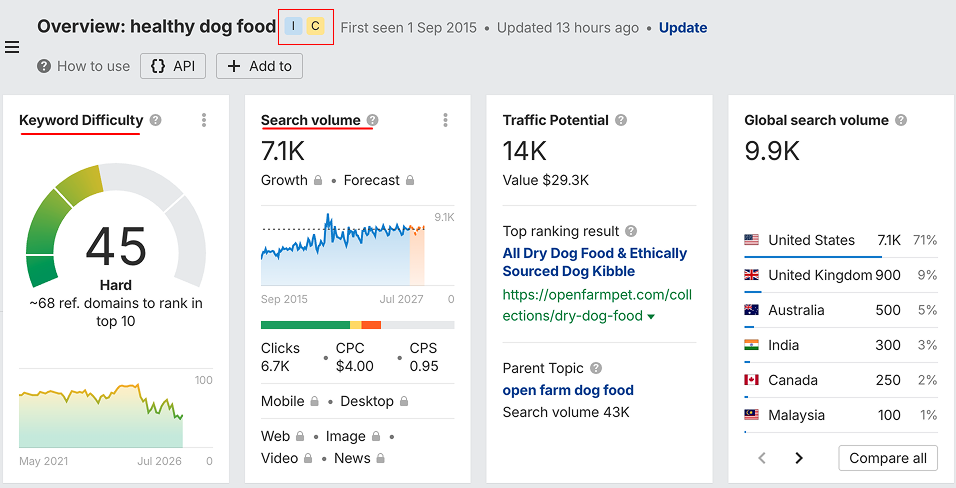
A lot happening here. The main things you need to pay attention to are Keyword Difficulty (left), Search Volume (middle left), and User Intent (top).
We can see the Keyword Difficulty is hard, there are thousands of people a month searching this term, and users are mostly looking for products rather than a blog post. It’s information and commercial intent so you could write a blog post targeting this keyword, but it’s not ideal for a smaller website, so let’s find something a little easier.
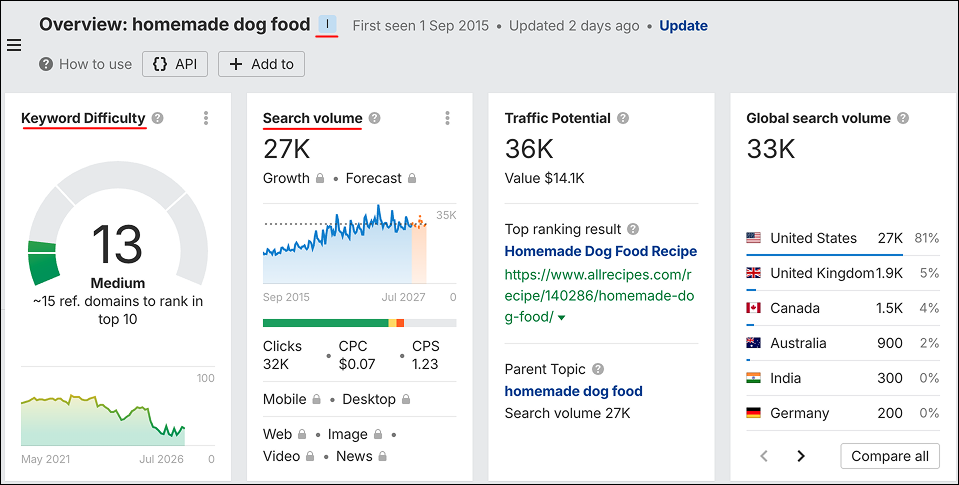
Homemade dog food. Much better. It’s purely information, it’s easy (KD 13), and there are a ton of people searching this keyword each month.
2. People also ask (PAA)
Put your keyword into Google, hit search, and scroll down. You’re going to find an FAQ section called People also ask (PAA).
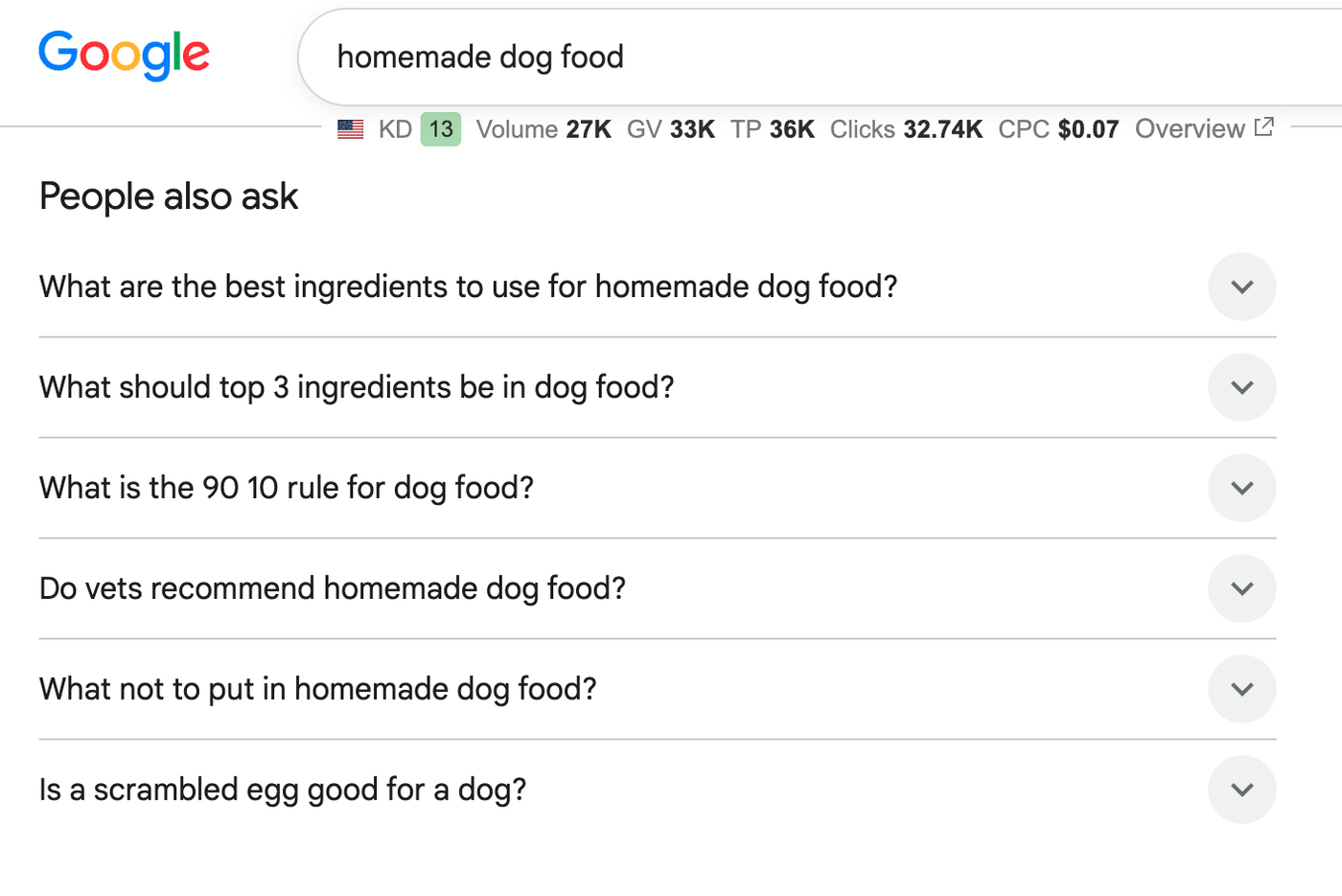
These are similar queries related to your keyword. When you go to write up your blog add these questions as they are and answer them in your blog.
By adding these questions, you can increase the number of readers to your blog post because you’re targeting multiple search terms.
You’ll see a lot of sites add these questions at the end of their page in an FAQ section; you can also do that, but I would recommend actually incorporating these questions into the article as subsections.
3. On-page SEO
Now that we have our keyword we need to put it to use. Where the keyword shows up on the page provides important signals for Google’s bot.
Here’s where you should place the keyword:
- URL slug
- Title
- First paragraph
- Meta title + description
- H2
- Content body x 2
- Alt text
Put the keyword in these places and that’s more than enough. Don’t repeat the keyword over and over that makes no difference and annoys anyone reading.
Let’s look at a site that’s following these guidelines.
Meta title and description:
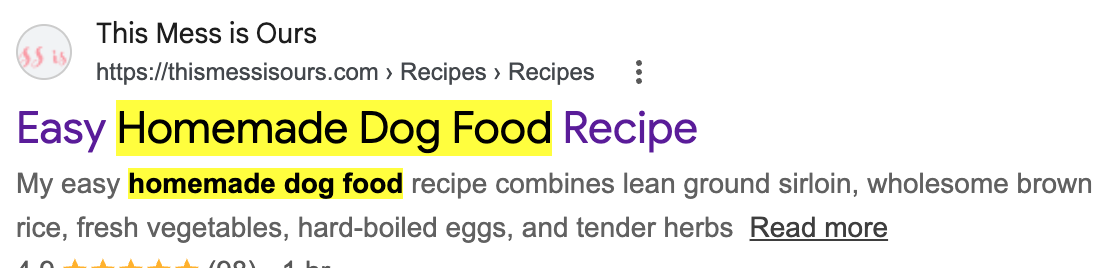
See how this web page follows the same principles. This is one reason why they are at the top of Google’s search result. They put the keyword in the title, the URL slug, the first paragraph, in a sub-header and it’s in the body several times.
The meta title can be the same as the on-page title, but keep in mind it’s got a 60 character limit. The meta description has a 160 character limit and doesn’t always need the keyword though I usually write some variation of it in there.
Alt text is the hidden description for an image. It’s for screen readers and also works for Google image search. Best practice is to use the keyword in the alt text if it makes sense. If you had a picture of homemade dog food then obviously use the keyword, but if it’s a dog or something unrelated then try to describe what the image is.
There’s no benefit to keyword stuffing here.
About the URL slug, don’t include numbers or dates, try to keep it tight and to the point. A good blog post can last years and you’ll likely add to it so keep the slug evergreen.
❌ /11-reasons-why-you-should-buy-homemade-dog-food-2026/
✅ /homemade-dog-food-recipe/
4. Structured Content
This is the last step before you get to the actual writing. Let’s talk about how the article or blog is going to be formatted.
With blog content, you should always organize the page into smaller sections, each section with a sub-heading describing what the section is about.
The best format for a blog:
- H1 - title
- H2 - sub header
- …
- Conclusion
It doesn’t matter how many H2s you have, just keep the hierarchy clean with only one H1. The conclusion is also optional; don’t get hung up on it, generally that’s the place you use to tie the blog post to your product or service.
On writing
Keep the introduction short and to the point. Start with the most important information and then work your way down section by section.
If we take the dog food recipe for example, the actual recipe should be at the top of the article—that’s the information the reader wants the most, so don’t bury it in the middle. After that, address the subtopics that relate to the central point of the piece.
With a lot of blogs you are going to be answering questions that people have. Remember when we looked at the PAAs? Those questions you should try to incorporate into your blog.
One of the PAAs was “What not to put in homemade dog food?” You could easily dedicate an entire section with an answer to that question.
When answering questions, always provide a clear answer straight away. Don’t waffle, don’t write an introduction, just answer the question.
For example:
What not to put in homemade dog food
You should never put onions, garlic, grapes, raisins, or chocolate in homemade dog food ever. These foods are toxic for dogs…
You should always try to answer the question in 1-2 short sentences. Google likes this, AI likes this, and the reader appreciates this.
Do this with every section of your blog that addresses a specific query. It doesn’t matter if the answer is more complex, you can explain that in the following sentences.
5. Don’t use AI
Now you can finally start writing your blog.
You’re probably tempted to spin something up with AI. I would advise against using AI to write your blog.
Most people don’t know what good content looks like. If you don’t know what good content is, you won’t be able to accurately assess what AI spits out.
Also, AI can be very general. You want to be very specific. AI will also write very long winded articles, longer does not mean better.
AI will output a mashup of the top results. It’s more or less a long winded version of what already exists on the web. That won’t cut it though. For Google to take you seriously you need to bring something new to the table.
I can’t explain how to write good content in this article, we don’t have enough time, but I’ll leave you with a few pointers.
To rank on the first page of Google, you're going to have to write something that is at least 20% better than the current top results. Usually, that’s providing a new perspective, new data, or new information that no one else has written about.
Think about that while you research for your blog. Try to put yourself in the shoes of the reader, and identify what would be most helpful and useful for them. Think about questions they don’t even have yet and answer them. Look at the competition; what have they overlooked?
Now get to writing.
6. Interlinking
Interlinking is when we link from one internal page to another. Good interlinking means that every page on your website has links pointing to it.
When we publish a new blog it has no links from other pages pointing to it. This is what we call an orphan page. When a page is orphaned it takes longer to index because it’s harder for the Google bot to find.
The best practice is to link to 2-3 of your older blog posts from your new blog. And link to one or two of your money pages. Once you publish the blog, go back and add links to old blogs that point to the new piece.
Interlinking like this creates a structured spiderweb where Google can easily leap from page to page.
7. Images
Images are going to be more essential for some blogs while not super important for others; it depends on the user intent.
If you are writing about food, destinations, travel, animals, products — anything visual you should add images. People want to see images, and Google takes that into consideration.
If you are writing a how-to guide or tutorial, use graphics or diagrams in place of pictures. Imagery in general serves to break up blocks of text and creates a better user experience.
Stock images are fine, but custom images are always the best.
People often forget that Google images (the tab) is a place that many people search as well. People scan through images and will click through to websites or articles based on what they see. Your images will drive traffic to your website.
That’s why it’s important to add alt text to all your images. That’s how they will appear in the images tab.
The downside of lots of images is that they can slow down your page. High resolution images take longer to load and if you have a dozen of them you’ll have a slower page which can affect rankings.
This issue can be solved by compressing the images or downloading smaller files. WebP files are the best. When compressing images aim for a size around 200kb. At this size the image will still look nice and won’t affect page speed.
SEO content writing services
I help sites write SEO content at scale. We produce 50-100 pages at a time to seriously increase the traffic to a website and dominate the search results. If you need help with content writing for your website or just need someone to scale your blog, shoot me a message!